

















No products in the cart.

Shop this story
The Technological Challenges of Working From Home
by Joseph L
Working from home is still the “new normal” for some lucky humans out there 🙌. It requires time to get accustomed to this routine, but once you realize the gem you have, you will find out how many hidden perks it has.
Making you feel productive and comfortable at the same time is tricky. What works for me may not for you. But during my years of experience working with technology, I have a bit of a grasp of which device could better follow common sense. So I hope these recommendations can make an impact on your work performance.
How to choose
When you are scouting which gadget to buy, the first variable that should come to your mind is budget. Don’t just think about the laptop, but a little further. Think also, what else do I need in terms of comfort? Yes, you read that right: comfort! Imagine how many hours you will spend day after day to start realizing the significant reality. Will my body feel OK? What are my current limitations? Etc.
Before starting, a confession: I am not an Apple fan. Here is when I take my armor and sword and say sorry. Well, not actually. See, even though Apple has excellent products out there, I am not a guy who is willing to spend more than necessary for a tech gadget. So, I’d always go for the simple simple-quality-price approach. Yes. It is proven Apple tech lasts longer than the rest of the tech devices out there. But if you want to live out of debt, it is better to go with a more frugal approach and be prepared to spend the same amount in 6 years. Yes, that’s the news. Planned obsolescence is here to stay, but that’s why I’m here to guide and keep you up-to-date on the best opportunities following this quality approach.
I know it could feel a little arrogant to pinpoint and recommend specific devices and gadgets. Therefore, it is fair to clarify that the following recommendation list is based on 15+ years of experience and just the current set I use to working from home, hoping it can help you save hours of research and money and hopefully any discomfort.
Note: The images/links below contain affiliate links. We share products/knowledge that we have actually used or tested. At no additional cost to you, making a purchase using any of these links helps our company continue to create free content for you. For complete details, please read the company Disclaimer.
The laptop
Laptop prices have come up to the roof. Barely not five years ago, before the pandemic hit, I remember finding lower prices for the same set of features. Just last month, I had to change my laptop. So, what do you do? My answer: go for the basics that will work for any job. Think about what a software developer to a designer or an office person would use to fit all those roles simultaneously. Why? Because you never know what person you will be the next month. Yes, you read that right. Job roles are constantly changing, so please, bear with me and consider this detail now more than ever.
A laptop is a bare necessity when you have to handle documents, attend an online meeting, and making presentations. The most you require from a computer nowadays is minimum 16G of RAM, 512 GB of SSD storage, and of course, smart features with a decent quick processor. So, after some hours of research, the Dell brand was my winner, specifically the XPS 15 or 16 series with INTEL processors:
The explanation: (1) Before coming to the USA, I lived in sweltering weather. Over years of observation, I could notice how INTEL processors were more robust than their friendly rival AMD ones. I also could see how this applies to graphic card processors as well. So do yourself a favor in terms of thinking twice to purchase anything that reads AMD on it and is living in an ice-cold or extreme-hot place on Earth. (2) – From the processing power perspective, I find it just right for the wide range of professions out there. If I am not a content creator in a few months and decided to pursue a career in the software development world, I can say this is just fine. Not to mention this monster processor could serve really well for any local AI task I find myself into.
The tablet
Some people think if you have a laptop, then a tablet is of no use. But when you work from home, you might not always have time to sit and open a laptop for work. Also, because sitting all day is terrible for your health. And you might want to consider switching here if you are in the middle of just reading and not typing at the time. It also helps you send faxes and printing. Maybe you go on a business trip, although I don’t think these days; Nah, just joking. Anyways, you can handle all of that through your tablet. After hours of research and analysis, I discovered this wondrous device:

Samsung Galaxy Tab S9 11” 256GB WiFi 7 Android AI Tablet, Snapdragon 8 Gen 2 Processor, AMOLED Screen, Durable Design, S Pen Included, Long Battery Life, Auto Focus Camera, US Version, 2023, Graphite Graphite 256 GB S9 Wifi Tablet Only
- GALAXY AI IS HERE: Search like never before, let transcript assist take the notes for you, format your notes into a clear summary, and effortlessly edit your photos - all from your tablet, all with AI
- OUR MOST POWERFUL TABLET PROCESSOR YET: From work time to playtime, unleash greatness in every experience with a superfast Snapdragon 8 Gen 2 chip, our most powerful tablet processor yet⁵
- INTENSELY BRILLIANT SCREEN: Elevate your entertainment with an 11" Dynamic AMOLED 2X screen⁶; Get ready for intense colors, deep contrasts and unbelievable brilliance; Plus, Vision Booster automatically adjusts brightness and contrast
The explanation: Take a look at the reviews on Google about this tablet, watch some YouTube and Best Buy’s customers’ reviews, and we can discuss further. But for now, this was my approach for picking this little one.
Tablet tempered glass
When using a tablet, there is always the risk it might slip from your hands. Also, the broken screen might cost you too much to replace. So, it is better to protect it with tempered glass. It also protects the screen from all kinds of scratches and scuffs.

JETech Screen Protector for Samsung Galaxy Tab S9 11-Inch and Galaxy Tab S10 Lite / S10 FE / S9 FE 10.9-Inch, with Easy Installation Frame, Tempered Glass Film, HD Clear, 2-Pack TabS10Lite/S10FE/S9FE/S9
- [Compatibility] Designed for Samsung Galaxy Tab S9 11-Inch and Galaxy Tab S10 Lite / S10 FE / S9 FE 10.9-Inch. Please check before purchasing
- [Easy Installation] Come with an easy installation frame. Allow perfect alignment and quickly install the screen protector without leaving any air bubbles
- [Anti-Scratch] Built with premium tempered glass up to 9H hardness (harder than a knife). Perfectly keep the screen highly resistant to daily scratches and abrasions
The explanation: For this type of accessory, I often go for Amazon’s Choice tag in it, so that’s it!
Tablet case
For better protection of your tablet, it is better to buy a tablet cover. Buy one with a stand at the back so you can place it on a shelf or desk:
Sale
![Soke Case for Samsung Galaxy Tab S9 2023 [SM-X710/X716B/X718U]-Premium Shock Proof Stand Folio Case, Multi-Viewing Angles, Soft TPU Back Cover for Galaxy Tab S9 11 inch Tablet, Black](https://m.media-amazon.com/images/I/71rrIYiopRL.jpg)
Soke Case for Samsung Galaxy Tab S9 2023 [SM-X710/X716B/X718U]-Premium Shock Proof Stand Folio Case, Multi-Viewing Angles, Soft TPU Back Cover for Galaxy Tab S9 11 inch Tablet, Black
- Designed for Galaxy Tab S9 11 Inch -- Exclusively designed for New Samsung Galaxy Tab S9 11" (SM-X710/X716B/X718U,2023 Released).
- Designed for Full Protection -- Hard PC back shell protect your new Galaxy Tab S9 11 Inch from shocks, drops and impacts. Magnet secure the case closure.
- Designed for Folio Stand -- With dual standing positions for enjoying the most comfortable viewing angles.
The explanation: For this type of accessory, I often go for Amazon’s Choice tag in it, so that’s it!
Standing desk
Now when we are talking about the desk, please buy one portable for you. They come in all sizes, and you can use them to put your laptop or tablet on them. At this moment, the Flexispot won the contest because of its awesome reviews. Also, this specific one has great size, not too large, and not too small. Check it out!
The explanation: I could recite a very long recovery from a lower back pain crisis after almost three years of my life and countless hours sitting while working under a tremendous amount of pressure and stress. Please, do yourself a big favor today and take care of your back. For those who have suffered it, you know what I mean. The standing desk will help to make a change before it happens! And to complement it, I’d add an anti-fatigue mat so you can stand on it. I can feel a big difference using this one:

ComfiLife Anti Fatigue Floor Mat – 3/4 Inch Thick Kitchen Mats for Floor, Standing Desk Mat, Kitchen Rug – Comfort at Home, Office – Durable – Stain Resistant – Non-Slip Bottom (20" x 32", Black) 20" x 32" Black
- Exceptional Comfort Anti Fatigue Mat: ComfiLife kitchen mats for floor enhance comfort while standing. It is professionally engineered and can be used as padded kitchen mat or for your standup desk that will not lose support over time. Ideal for use as a standing desk mat., kitchen mats cushioned anti fatigue, kitchen floor mat or anti-fatigue mats for kitchen floor.
- Premium Quality Construction: The ComfiLife cushioned mat core is made of 3/4 thick, high-density memory foam that reduce discomfort on feet, knees, legs, and back while standing for an extended period. This kitchen mats cushioned anti-fatigue offers exceptional durability and long-lasting support. Perfect for high-traffic areas like the kitchen, office, or garage.
- Multi-use Floor Mat: The ComfiLife standing pad is exceptional for your office while standing at your desk, the kitchen while doing dishes, the laundry room while folding clothes and while working at your workbench. This kitchen rug will add comfort and style to your kitchen and provide lasting comfort and enhanced productivity wherever you stand.
Laptop bed tray table
Lazy and don’t want to come out of bed, but it an office day? There are laptop bed tray tables to save you from any such situation. They are stands you can put your laptop on and work from your bed. The NEARPOW brand was the clear finalist from my research list because of its outstanding features and positive reviews. This one is usually on discount during Cyber Monday sales. Yes, I followed the price using Honey (another tool I might talk about in the future), so I could get it cheaper 😉

Nearpow Laptop Bed Tray Table, Adjustable Laptop Bed Stand, Portable Standing Table with Foldable Legs, Foldable Lap Tablet Table for Sofa Couch Floor - Medium Size Black Medium
- Multifunctional - As a laptop workstation, laptop table for bed, a children's bed table, a mini writing table, a standing table for office work, laptop couch table, or a book/tablet table
- Folding Size: 20.5"x11.8"x2.32", Weight:3.13lbs, High Quality Material: Sheet Material of EO, ABS Aluminum, Silicone Non-slip
- Easy to use - Fully assembled, Two auto-lock buttons on each side easily enable quick changes in height, legs can be set to 5 different heights (adjustable from 9.4" - 12.6") in addition two clamps may be used to adjust the surface angle, surface can be set to 3 different angles (from 0-30°). The prevent slippery of mouse wristbands and ledge on the bottom keep your laptop safe while tilted, providing comfort and stability
And if you need to elevate your laptop even further, this ingenious gadget is perfect for placing underneath. Its clever design prevents the laptop from slipping off the tray table.
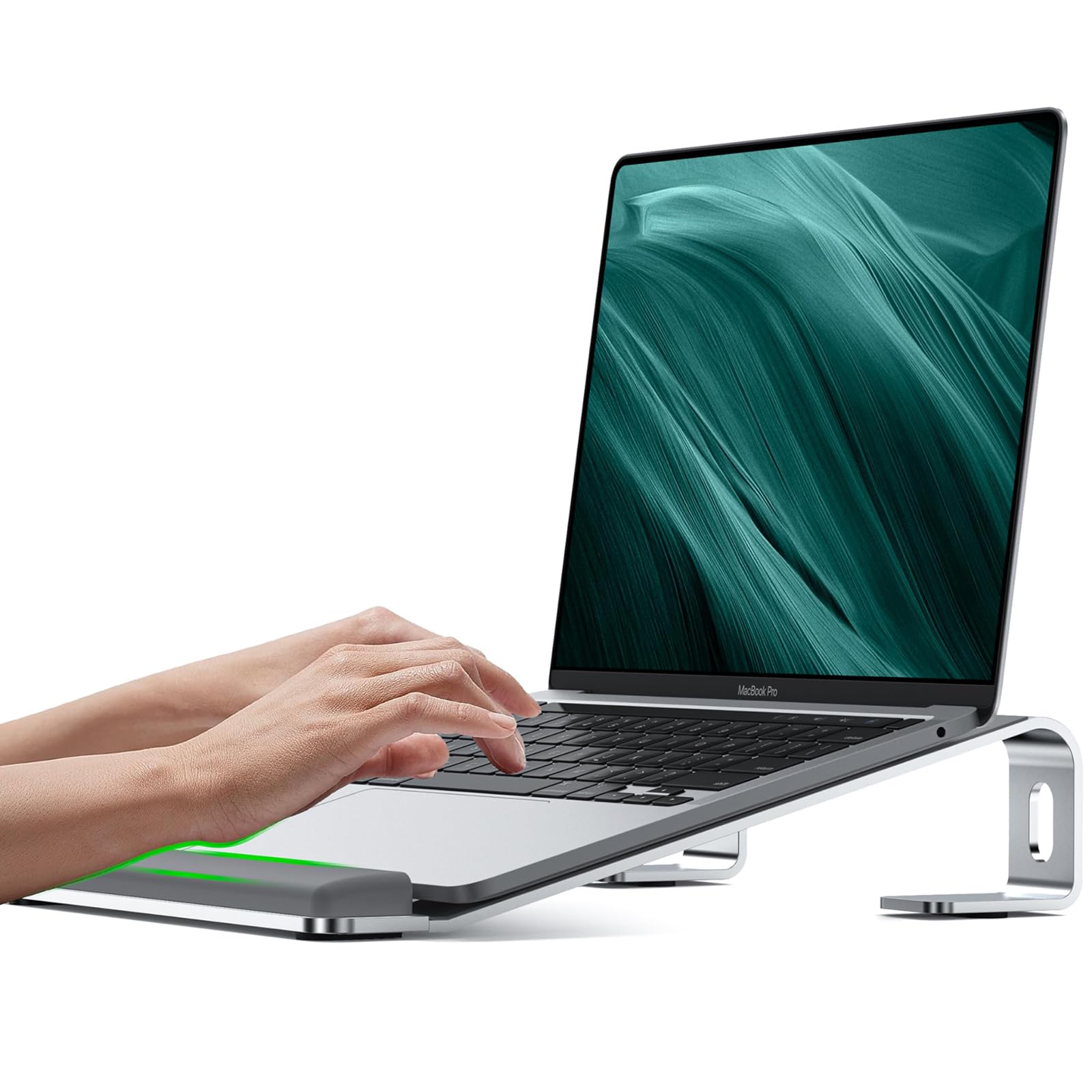
JCZT Aluminum Laptop Stand, Notebook Stand with Wrist Rest, Ergonomic Detachable Laptop Mount, Computer Stand Compatible with 10-17'' All Laptops Such as MacBook Air Pro/HP/Dell/Lenovo, Silver
- Wrist Protection - JCZT laptop stand equipes with unique heighten rubber pads can effectively reduce wrist fatigue when typing, laptop stand for desk has large rubber pads, distributed on the upper and bottom of the computer stand for desk, to prevent the laptop from falling and scratching your arm or the table, Perfect laptop accessory for office, home use. Ideal christmas gift for your friends and family.
- Compatible with 10-17 Inch Laptops/Tablets - The laptop cooling stand fits all laptops tablet up top 17 inch, such as, MacBook Air 11-15 inch, MacBook Pro 14 -16 inch, ipad mini ,ipad pro, ipad air ,HP Stream , HP Envy ,HP Spectre 13-17 inch,HP OMEN, HP VICTUS; DELL XPS , Latitude ,inspiron Plus 13-17 inch, Alienware 16 inch; ThinkPad 13.3 inch- 15.6 inch; Lenovo IdeaPad,Lenovo V15 15.6 inch; Microsoft Surface Laptop,Surface Book , Surface Pro 7 12.3- 13 inch, Surface Go 10 inch; Google Chromebook, Google Pixelbook; Sony 11-16 inch, Toshiba 11-16 inch, HUAWEI Matebook, HUAWEI Matebook X PRO 14-16 inch; Samsung Galaxy book, chromebook 12.2-15.6 inch;LG Gram/Pro 14-17 inch
- Sturdy & Stable - This computer stand for laptop made of aviation grade aluminum alloy, Three different force points provide strong support for your laptop device, No wobble when typing, will not be rusted or corroded, working life up to 10 years, It is detachable and does not require screws, It is easy to assemble and disassemble.
The explanation: Even standing or sitting all day without moving is also bad for your body. If you want a change and cannot simply go out to walk while working, the bed tray table will be your best friend here to take care of your back. Take note some neck discomfort could appear depending on the amount of time you are in this position. Please remember to change every 20-30 minutes under a significant working-stress situation. After all, our body was designed to move, not to be straight like a statue all day.
Final thoughts
If you are not already familiar with technology, keep one thing in mind that not all expensive tech gadgets need to be fair to use. Know your desires and choose one that will best suit your needs and has an outstanding balance in price and quality.
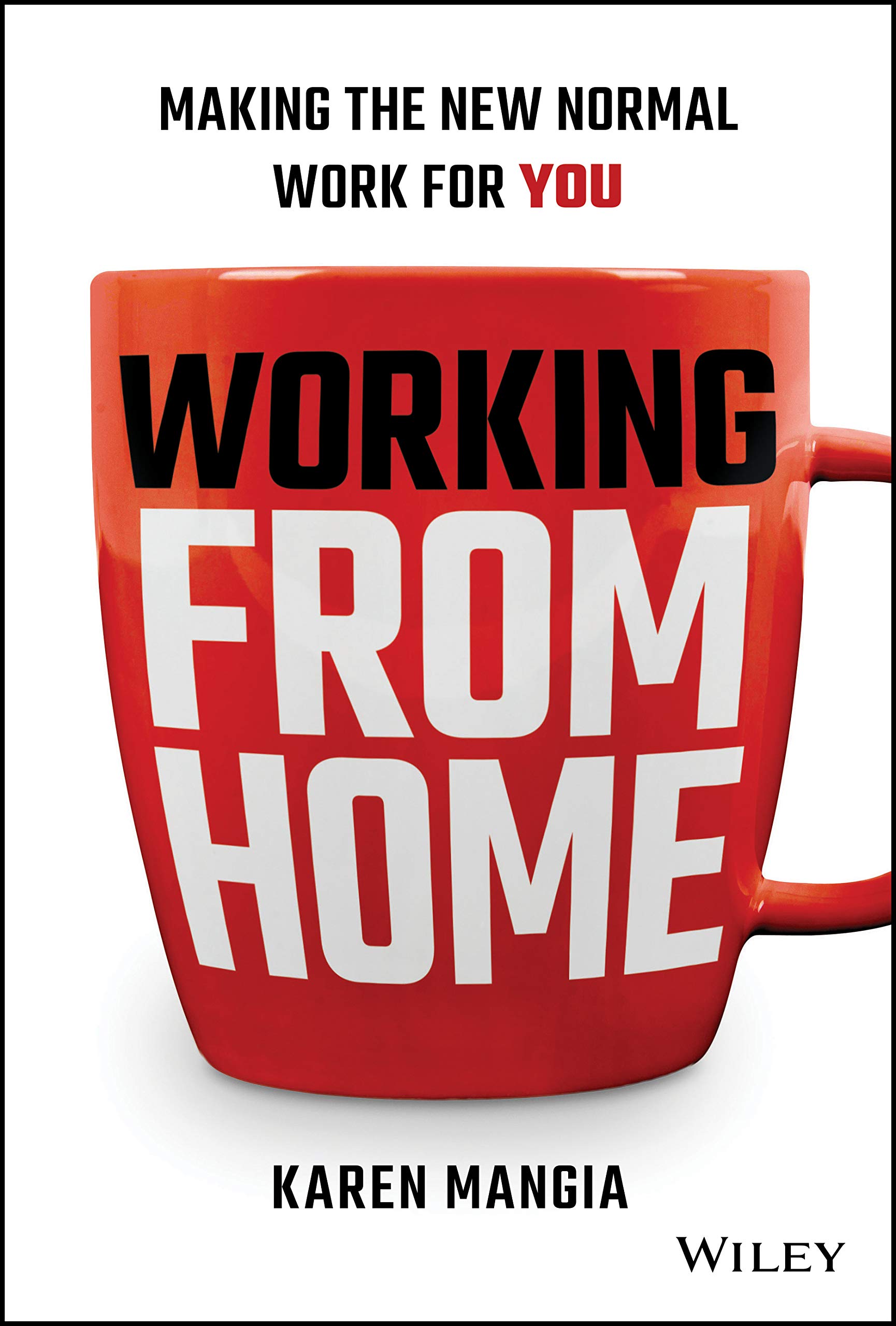
Make your work from home worth the experience and a lot more comforting with the gadgets and accessories mentioned above. In addition, there is a very recent book worth reading by Karen Mangia named “Working From Home: Making the New Normal Work for You.” It touches on other relevant topics for further information:
Ready to share your opinion? Don’t forget to leave your thoughts in the comment section below. Happy working-from-home day!
Last updated on: 2026-07-19 / Affiliate links & Images from Amazon Product Advertising API.
Further reading

Leave a comment